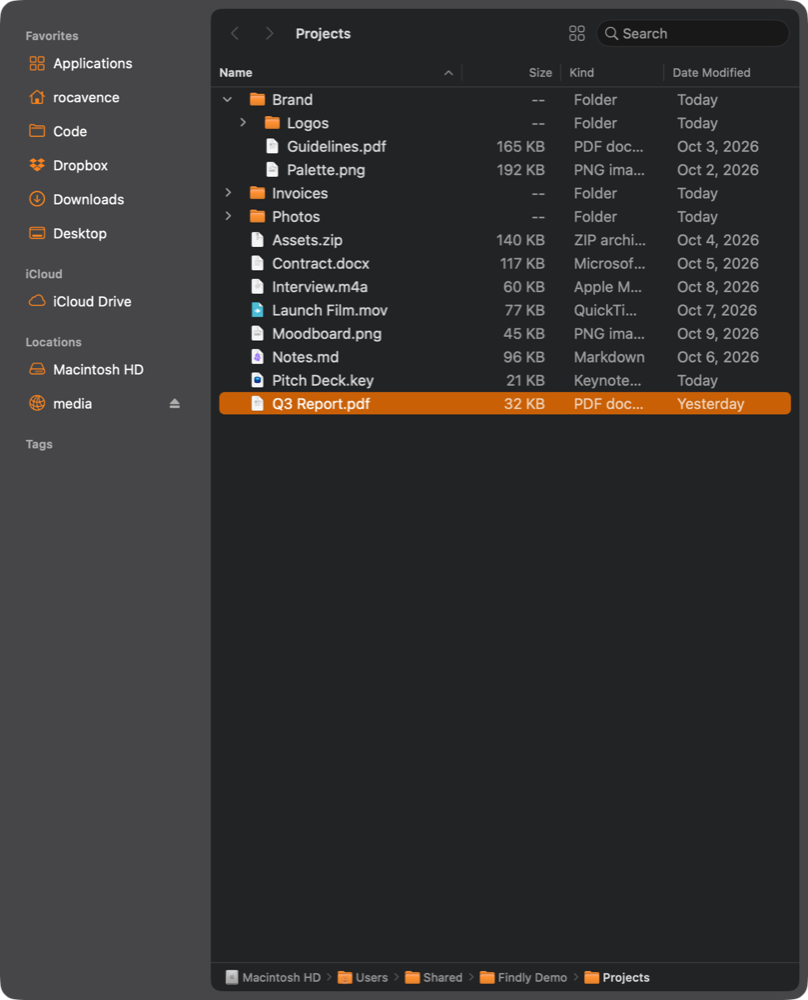
Findly is a macOS menu bar utility: press Ctrl + ~ to slide a Finder-style file drawer in from any screen edge—switch to another app and it parks itself off-screen.
The first idea was to drive the real Finder as the drawer via Accessibility—complexity exploded. Switching to its own window made everything far simpler.
1
Its own window, not the real Finder
Its own NSPanel; one line of collectionBehavior puts it on every Space—no Apple Events, Accessibility, or private SPI.
2
Summon from any edge
Menu bar or global hotkeys Ctrl + ~, or Ctrl + Option + an arrow key; it appears on whichever screen the mouse is on.
3
Parks itself off-screen
Switch to another app and it auto-parks off-screen; press the hotkey again to slide it back. Drag the inner edge to resize—it remembers.
Features
Like Finder, but on call
NSOutlineView gets it close to Finder's list view, plus the conveniences a drawer should have.
🪟
Liquid Glass look
A macOS 26 translucent window; sidebar and file list as two rounded inset cards.
⭐
Finder's own sidebar
Favorites in Finder's order, plus iCloud, external drives (eject right there) and tags. Turn items on and off one by one, or switch on “Same as Finder” and it follows Finder's own settings.
🗂️
A real Finder-style list
Four sortable columns, grouping by kind, folders that expand in place. Return renames, Cmd + Delete trashes, Space opens Quick Look, just like Finder.
⌨️
Global hotkeys
Ctrl + ~ to summon, Ctrl + Option + an arrow key to pick an edge, or click the menu bar icon (right-click for the menu). No extra permissions.
🖥️
Appears on every Space
One line of collectionBehavior—summon it over any Space and full-screen apps.
📐
Drag in, drag out
Drag files straight into another app, or into the drawer, a folder or the path bar. A clashing name gets a number instead of overwriting.
Install
Just drag it to Applications
Four steps, about a minute. Step 3 uses Terminal — don't worry, it's just copy and paste.
Click Download latest and download the .zip file from GitHub.
Open your Downloads folder, double-click the zip to unzip it, and drag Findly into the Applications folder.
Open Terminal: press Cmd + Space for Spotlight, type Terminal, and press Return.
Click Copy at the top right of the black box below, go back to Terminal, press Cmd + V to paste, then press Return. Findly opens; after that, open it from Applications as usual.
xattr -dr com.apple.quarantine /Applications/Findly.app && open /Applications/Findly.app
Wait, what is this? Findly is a free, self-signed app that isn't notarized by Apple. I don't make apps for a living; I just build small things I find useful and good-looking, and Apple's yearly developer fee isn't in the budget… So macOS blocks the first launch. This line only removes the quarantine flag added when you downloaded it, then opens Findly. It changes nothing else, and you only need to do it once.
Use Homebrew? One line, and no quarantine step:
brew install --cask rocavence/tap/findly
Full Disk Access: The drawer browses your whole file system and the sidebar mirrors Finder favorites, so grant Findly access in System Settings → Privacy & Security → Full Disk Access. Without it, protected folders (Desktop, Documents, Downloads, cloud storage) show up empty.
I wanted a file drawer I could summon on a whim and dismiss just as fast. Borrowing the real Finder's window cost too much, so I built my own—and got a far cleaner architecture for it.
Findly is tiny, open source, and free. The whole thing grew out of conversations with Claude Code. If it makes grabbing a file smoother for you too, it was worth it.